Module 3: Chapter 4 — Arrays and Strings
Arrays
Introduction
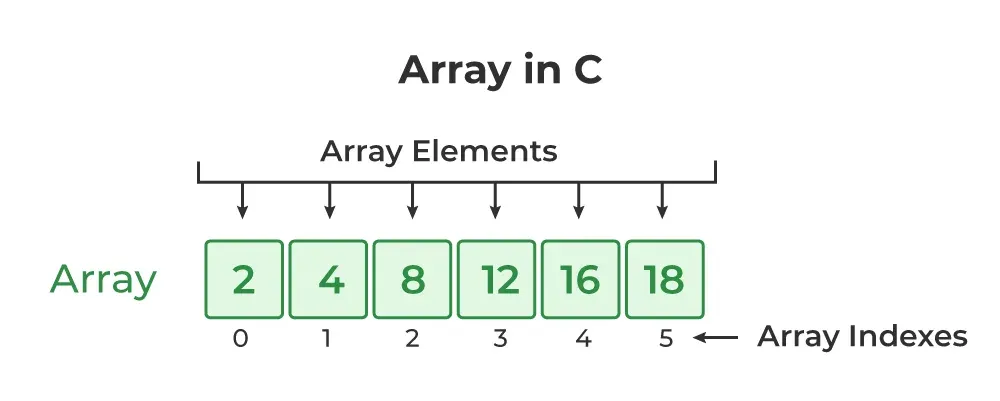
An array is a collection of similar data elements stored under a single name. These elements all have the same data type and are stored in consecutive memory locations. Each element is identified by a unique index (subscript), which represents its position in the array.
(Arrays-in-C)
- The subscript is an ordinal number used to access an individual element of the array.
- Arrays allow us to efficiently manage and process large collections of related data items of the same type.
Example: A student's marks in 10 subjects can be stored using an integer array instead of creating 10 separate variables.
Declaration of Arrays
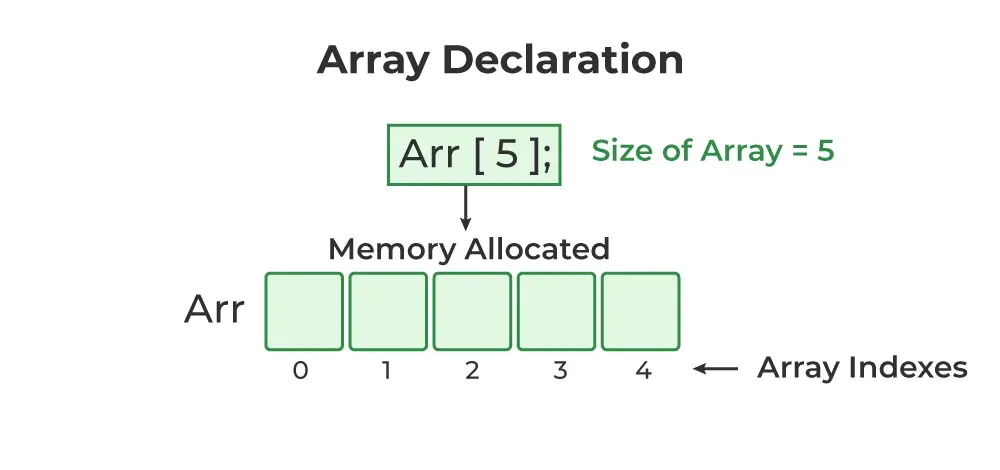
Before an array can be used, it must be declared in the program. Declaration reserves memory and defines the type and number of elements the array can hold.
(Arrays-Declaration)
Syntax:
type name[size];
When declaring an array, you must specify:
-
Data type: The kind of values the array will store
(e.g.,
int,char,float,double). - Name: A valid identifier for the array.
- Size: The total number of elements the array can hold.
Example:
int marks[10];
This statement declares an integer array named marks that
can hold 10 elements. In C,
array indices start from 0. Thus:
- The first element is stored in
marks[0] - The second element in
marks[1] - ...
- The last element (10th) is stored in
marks[9]
Note: The index or subscript written inside square
brackets [ ]
must always be an integer value or an expression that evaluates to
an integer.
Array Initialization
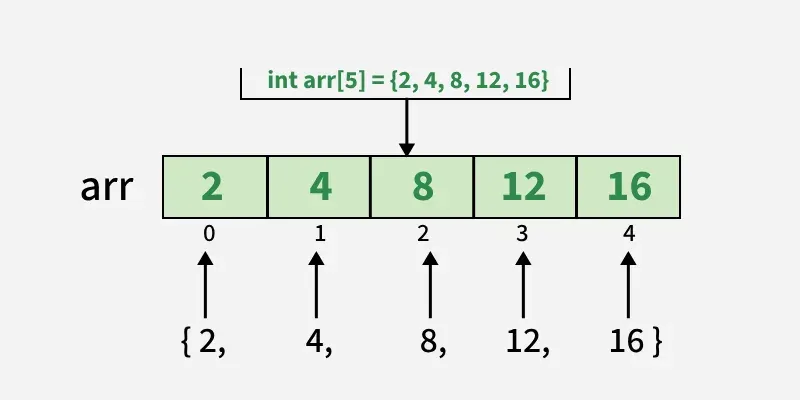
When an array is declared or memory is allocated, its elements may contain garbage values. Therefore, it is important to initialize the array with meaningful values.
- You can skip specifying the size of the array if you are declaring and initializing it at the same time.
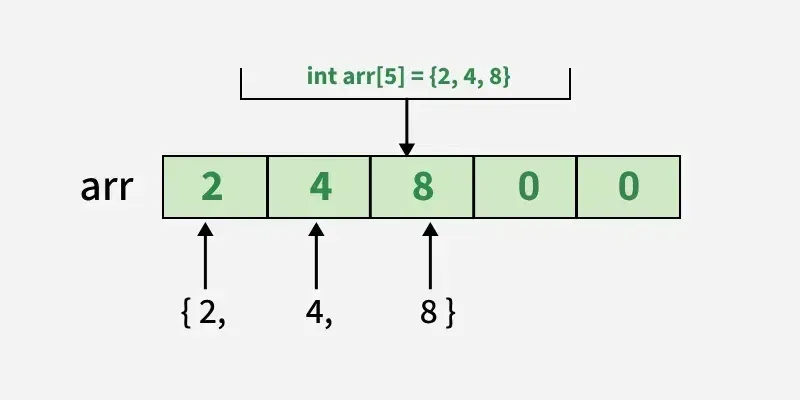
- Partial initialization is allowed. The remaining elements that are not explicitly initialized will automatically be assigned 0 (or the equivalent default value for the data type).
Examples:
            int numbers[] = {1, 2, 3, 4, 5}; // Size inferred from number of
            elements

            int marks[10] = {50, 60, 70}; // First 3 initialized, rest set to 0
Note: Proper initialization ensures that your program does not produce unexpected results due to garbage values in the array.
(Arrays-Initialization)
(Partial-Arrays-Initialization)
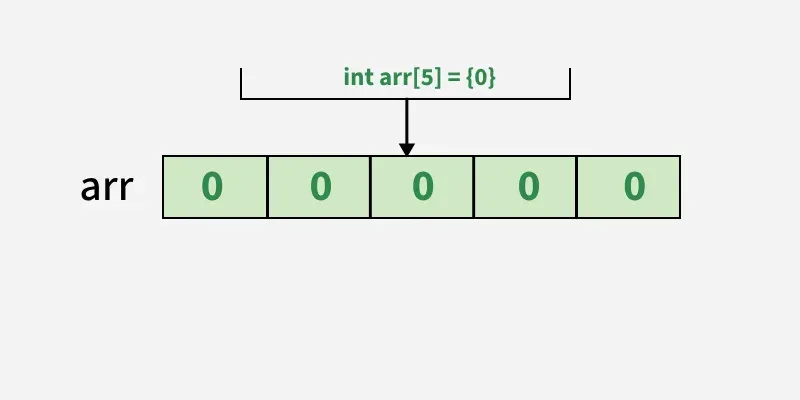
(Array-Initialization-With-Zero)
Accessing the Elements of an Array
Array elements can be accessed individually using their indices. To process all elements of an array efficiently, loops are typically used.
- The subscript must be an integral value or an expression that evaluates to one.
-
The
forloop is most commonly used to iterate through all elements of an array.
Example: Setting All Array Elements to -1
            int i, marks[10];

            for(i = 0; i < 10; i++) {

              marks[i] = -1;

            }
In this code:
-
The loop starts with
i = 0, so the first elementmarks[0]is set to-1. -
Each iteration increases
iby 1, updating the next element. -
The process continues until
marks[9](the last element) is set to-1.
Remember: Array indices in C always begin at
0 and go up to size - 1. Accessing beyond
this range may cause unexpected behavior.
Passing Single-Dimension Arrays to Functions
Definition
In C, an entire array cannot be passed to a function by value. Instead, the base address of the array is passed to the function. This is done by using the array name without any index, which acts as a pointer to the first element of the array.
Syntax
funcName(arrayName);
Explanation
- The array name represents the address of the first element.
- The function receives a pointer to the array, not a copy of all elements.
- Any modification inside the function affects the original array.
- C does not perform bounds checking on arrays.
Example
          int main() {

            int i[10];

            func1(i);

          }


          void func1(int *x) {

            /* access array using x */

          }
Ways to Receive an Array in a Function
Definition
A function receiving a single-dimension array can declare its parameter in different forms, all of which are treated as a pointer internally.
Syntax
      void func(int *x);

      void func(int x[10]);

      void func(int x[]);
Explanation
- Pointer form: Explicitly shows pointer usage.
- Sized array: Size is ignored by the compiler.
- Unsized array: Most flexible and commonly used.
- The compiler always treats these as receiving an integer pointer.
Note: Even int x[32] does not create a 32-element
array inside the function. Only a pointer is passed.
Strings in C
Definition
A string in C is a one-dimensional array of characters
terminated by a null character (\0).
Syntax
char str[size];
Explanation
- The null character marks the end of the string.
- Memory allocated must include space for
\0. - String literals automatically include the null character.
- Strings are stored sequentially in memory.
Example
      char str[11] = "HELLO WORLD";

      // 10 characters + 1 null character
String Handling Functions (string.h)
Definition
C provides a standard library <string.h> that contains
predefined functions to manipulate strings.
Common Functions
strlen(): Finds string lengthstrcpy(): Copies one string to anotherstrcat(): Concatenates stringsstrcmp(): Compares two stringsstrchr(): Finds first occurrence of a characterstrrchr(): Finds last occurrence of a character
strlen() : String Length
Definition
The strlen() function returns the number of characters in a
string, excluding the null character.
Syntax
size_t strlen(const char *str);
Explanation
- Counts characters until
\0is encountered. - Returns length in bytes.
- Does not modify the string.
strcpy() : String Copy
Definition
The strcpy() function copies the source string into the
destination string, including the null character.
Syntax
char *strcpy(char *dest, const char *src);
Explanation
- Destination must have enough space.
- Stops copying when
\0is found. - Returns the destination pointer.
strcat() : String Concatenation
Definition
The strcat() function appends one string to the end of another.
Syntax
char *strcat(char *str1, const char *str2);
Explanation
- The null character of the first string is replaced.
- Characters of the second string are appended.
- Destination must have sufficient memory.
strcmp() String Comparison
Definition
The strcmp() function compares two strings lexicographically.
Syntax
int strcmp(const char *str1, const char *str2);
Explanation
- Returns 0 if strings are equal.
- Returns positive value if
str1 > str2. - Returns negative value if
str1 < str2.
Remember, strcmp() returns false if the strings are equal. Be sure to use the logical ! operator to
reverse the condition, as just shown, if you are testing for equality
strchr() and strrchr()
Definition
These functions search for a character in a string and return a pointer to its position.
Syntax
      char *strchr(const char *str, int c);

      char *strrchr(const char *str, int c);
Explanation
strchr()finds the first occurrence.strrchr()finds the last occurrence.- Returns
NULLif character is not found.
Two-Dimensional Arrays
Definition
C supports multidimensional arrays. The simplest form is a two-dimensional array, which can be thought of as an array of one-dimensional arrays arranged in rows and columns.
Syntax
data_type array_name[row_size][column_size];
Example
int d[10][20];
Explanation
- The first index represents the row.
- The second index represents the column.
- Each dimension is specified using a separate pair of brackets.
- C does not use commas to separate dimensions.
Accessing Elements in a Two-Dimensional Array
Definition
Individual elements of a two-dimensional array are accessed using two subscripts: one for the row and one for the column.
Syntax
array_name[row_index][column_index]
Example
d[1][2];
Explanation
d[1][2]accesses the element in the 2nd row and 3rd column.- Array indices start from
0. - Both indices must be integer values or expressions.
Example: Initializing and Printing a Two-Dimensional Array
Program
          #include <stdio.h>

          int main(void) {

            int t, i, num[3][4];


            for(t = 0; t < 3; ++t)

              for(i = 0; i < 4; ++i)

                num[t][i] = (t * 4) + i + 1;


            for(t = 0; t < 3; ++t) {

              for(i = 0; i < 4; ++i)

                printf("%3d ", num[t][i]);

              printf("\n");

            }

            return 0;

          }
Explanation
- The array is filled row by row with values from 1 to 12.
num[0][0]contains 1,num[0][1]contains 2.- The last element
num[2][3]contains 12. - Nested loops are used to traverse rows and columns.
Memory Representation of Two-Dimensional Arrays
Definition
Two-dimensional arrays are stored in memory using row-major order.
Explanation
- The leftmost index represents the row.
- The rightmost index represents the column.
- Elements of each row are stored in contiguous memory locations.
- The column index changes faster than the row index.
Visualization
        1  2  3
        4  5  6
        7  8  9
Memory Requirement of Two-Dimensional Arrays
Formula
bytes = rows × columns × sizeof(data_type)
Explanation
- The total memory depends on array dimensions.
- The size of the base data type is multiplied.
Example
For an integer array int a[10][5] with 4-byte integers:
10 x 5 x 4 = 200 bytes
Passing Two-Dimensional Arrays to Functions
Definition
When a two-dimensional array is passed to a function, only a pointer to the first element is passed. The function must know the size of the rightmost dimension.
Syntax
void func(int arr[][columns]);
Example
          void func1(int x[][10]) {

            /* function body */

          }
Explanation
- The rightmost dimension must be specified.
- The leftmost dimension is optional.
- The compiler uses column size to calculate row offsets.
- Without column size, correct indexing is not possible.
Example: Matrix Addition Using Two-Dimensional Arrays
Program
          #include <stdio.h>

          int main() {

            int a[2][2] = {{1,2},{3,4}};

            int b[2][2] = {{5,6},{7,8}};

            int sum[2][2];

            int i, j;


            for(i = 0; i < 2; i++)

              for(j = 0; j < 2; j++)

                sum[i][j] = a[i][j] + b[i][j];


            printf("Sum of matrices:\n");

            for(i = 0; i < 2; i++) {

              for(j = 0; j < 2; j++)

                printf("%d ", sum[i][j]);

              printf("\n");

            }

            return 0;

          }
Sum of matrices:5
6 85
10 125
Explanation
- Two matrices are stored using two-dimensional arrays.
- Each element is added using nested loops.
- The result is stored in a third matrix.
Multidimensional Arrays
Definition
C allows the creation of multidimensional arrays, which are arrays with more than one dimension. These arrays extend the concept of one-dimensional and two-dimensional arrays to multiple levels.
Syntax
data_type array_name[size1][size2][size3]...[sizeN];
Explanation
- Each pair of brackets represents one dimension.
- A multidimensional array is an array of arrays.
- The number of dimensions depends on the problem requirements.
- Arrays with more than three dimensions are rarely used in practice.