Basic HTML Portfolio
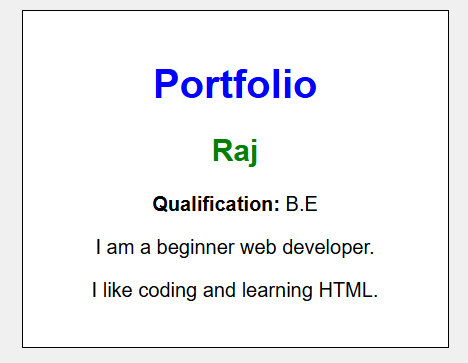
This is a simple portfolio webpage created using only inline CSS.
                    <!DOCTYPE html>
                    <html>

                    <body style="font-family:Arial; background:#f0f0f0; text-align:center;">
                        <div style="width:300px; margin:50px auto; padding:20px; background:white; border:1px solid black;">
                            <h1 style="color:blue;">Portfolio</h1>
                            <h2 style="color:green;">Raj</h2>
                            <p><b>Qualification:</b> B.E</p>
                            <p>I am a beginner web developer.</p>
                            <p>I like coding and learning HTML.</p>
                        </div>
                    </body>

                    </html>
A simple portfolio page with Name, Qualification.
Colorful Portfolio Design
This example creates a colorful portfolio using gradients and styled buttons.
<!DOCTYPE html>
<html>
<body style="background:linear-gradient(to right,#4facfe,#00f2fe);font-family:Arial;">
    <div style="width:320px;margin:50px auto;padding:25px;background:white;text-align:center;border-radius:15px;">
        <h1 style="color:#0f172a;">Raj</h1>
        <p>B.E Graduate</p>
        <button style="background:#2563eb;color:white;padding:10px 20px;border:none;border-radius:5px;">
            Hire Me
        </button>
    </div>
</body>
</html>
A colorful background with a modern portfolio card.
Explanation:
- Uses a gradient background.
- The card has rounded corners.
- A blue button improves appearance.
⚠️ Common Mistakes
- Do not forget to close the
buttontag. - Gradient colors should be separated by commas.
Portfolio with Skills
This portfolio displays personal information along with technical skills.
                    <!DOCTYPE html>
                    <html>
                    <body style="font-family:Verdana;background:#f5f5f5;">
                        <div style="width:350px;margin:auto;background:white;padding:20px;border:1px solid #ccc;">
                            <h2>Raj</h2>
                            <p>Qualification: B.E</p>
                            <h3>Skills</h3>
                            <ul>
                                <li>HTML</li>
                                <li>CSS</li>
                                <li>JavaScript</li>
                            </ul>
                        </div>
                    </body>
                    </html>
A portfolio card displaying a list of technical skills.
Explanation:
- Uses an unordered list for skills.
- Shows qualification and technical abilities.
- Simple layout for beginners.
⚠️ Common Mistakes
- Always close the
<ul>and<li>tags. - Keep indentation consistent for readability.